
AC Auto
Main menu key: n
Uses a Mijia BLE temperature/humidity sensor to auto-send IR power-on / power-off for an air conditioner. Settings live in the ac_auto object in config.json, editable in on-device Options or Config Web (/ac-auto).
Screenshots
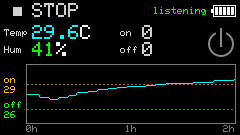
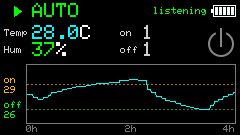
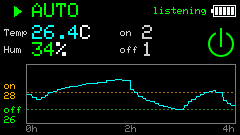
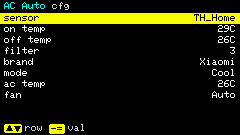
Prerequisites
- Add the HT sensor in Config Web → Devices (
modelcontainssensor_ht/.ht.) with a validble.key. - Aim the IR emitter at the AC receiver; brands match Infrared AC protocols (try another brand if no response).
- Configure
ac_auto: sensor,on_temp/off_temp,filter, and AC brand / mode / temp / fan.
Shortcuts
| Key | Action |
|---|---|
t | Start / stop AUTO |
c | Display ↔ on-device config |
s / BtnA | Blank screen; any key or BtnA wakes |
r | Reset on / off streak counters |
p | Toggle assumed AC on / off (icon only, no IR) |
h | Help (3 pages: keys / params / how it runs) |
, . [ ] | Flip Help pages |
Config ; . | Move row |
Config - = | Change value |
Back to menu: on the display page, ESC / GO. On the config page, ESC / GO closes config first; press again to leave the app.
How it runs
On enter, the app listens to BLE on a duty cycle (whether AUTO is on or not) and updates temperature / humidity plus a ~12-hour chart whenever a reading arrives.
The app does not sense the real AC power state; on enter it assumes off. If the AC is already on, press p to mark the power icon ON so a later cold reading can send IR off.
IR is sent only after you press t and AUTO is active:
| Condition | Action |
|---|---|
Temp > on_temp for filter consecutive readings, AC considered off | IR power on (configured mode / temp / fan) |
Temp < off_temp for filter consecutive readings, AC considered on | IR power off |
Temp between off_temp and on_temp | Clear on / off streaks (hysteresis) |
Example defaults: on_temp=29, off_temp=26, filter=3 → open only after three readings above 29°C; close only after three below 26°C.
BLE duty cycle
Many HT meters advertise every few minutes. In-app:
- Listen up to about 6 minutes per round
- After a valid reading, nap about 4 minutes
- Briefly keep listening after the first packet so
filtercan accumulate
Display
- Top: AUTO state, battery, BLE listen indicator
- Left: temp / humidity; right: on / off counts and AC power icon
- Chart: temperature trace with on / off threshold lines
Config fields (ac_auto)
| Field | Meaning | Typical range |
|---|---|---|
sensor_id | HT device id | Must match devices[] |
on_temp | Open AC when above (°C) | 16–40, default 29 |
off_temp | Close AC when below (°C) | 10–35, default 26 |
filter | Consecutive hits before action | 1–10, default 3 |
ac_brand | IR AC brand | midea / gree / … |
ac_mode | Power-on mode | cool / heat / dry / fan / auto |
ac_temp | Setpoint (°C) | 16–30 |
ac_fan | Fan speed | auto / min / low / med / high / max |
The Config Web /ac-auto page repeats this mechanism text under the settings form.