
RGB LED
Open with main menu h, then Hardware Test 5.
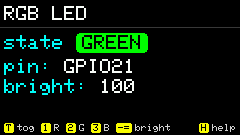
Test the onboard RGB LED: on/off, color, brightness. Shares power with the LCD backlight; leaving the App turns the LED off and restores backlight logic.
Screenshots
Shortcuts
| Key | Action |
|---|---|
t | Toggle on/off |
0 | Off |
1 | Red (also tip’s R) |
2 | Green |
3 | Blue |
1–7 | Preset colors (Help) |
- = | Brightness − / + |
h | Help |
Usage
- Pick a color with number keys, adjust with
-/=, toggle witht. - Brightness shifts when sharing the screen power path are expected.
ESCexits and clears LED state.