
Radio
Open from: main menu e → Grove 1 / r
FM radio on the left Grove port. Buy a ready-made TEA5767 or RDA5807M 4-pin module (I2C 0x60 or 0x10/0x11); both share one UI. Audio comes from the module headphone jack. Chip wiring and driver APIs: Grove.
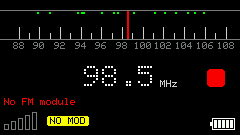
On enter it probes left Grove (Ex_I2C). No chip → NO MOD.
Screenshots
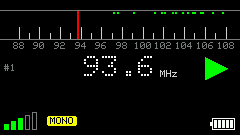
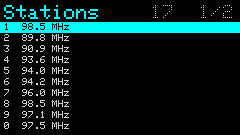
Playing / no module / station list
Module & wiring
Buy a ready-made 4-pin board. Neither TEA5767 nor RDA5807M needs soldering. Search for TEA5767 or RDA5807M and pick a module that already brings out SDA / SCL / VCC / GND and has a 3.5 mm headphone jack. Plug it in with Dupont or a Grove jumper.
Do not buy a bare board that still needs headers, an antenna, or an audio jack soldered on.
Which connector
Use the left-side Grove (HY2.0-4P), not the rear EXT header. With the screen facing you and the keyboard at the bottom, that 4-pin rubber socket is Ex_I2C. Top → bottom:
| Order (top→bottom) | Pin | Role |
|---|---|---|
| 1 | GND | Ground |
| 2 | 5V | Power |
| 3 | G2 | SDA |
| 4 | G1 | SCL |
Four pins
Pin order on the module varies by seller. Match silkscreen names to the left Grove; do not count left-to-right:
| Module 4-pin | Left Grove |
|---|---|
| SDA | G2 |
| SCL | G1 |
| VCC / VDD | 5V |
| GND | GND |
Headphones go in the module’s 3.5 mm jack — not the Cardputer speaker, and not AirPods / Bluetooth. Many modules use the headphone cable as the antenna; use a wired 3.5 mm headset or speaker. ExI2C should then show TEA5767 at 0x60, or RDA5807M at 0x10 / 0x11.
TEA5767 has no chip volume — use the headphone volume. RDA5807M: main-screen
-=(5×3 yellow grid beside signal) or Tuner → Volume.
Shortcuts
Full list: h Help (multi-page).
| Key | Action |
|---|---|
h | Help |
← → | Seek previous / next station; press same again to stop |
↑ ↓ | Fine tune step |
- = | RDA: volume · TEA: step tune |
[ ] | Previous / next saved station |
a | Auto scan and save |
m / o | Mute / force mono |
s / BtnA | Blank screen; any key or BtnA wakes |
l | Station list |
t | Open / close Tuner |
i | RDS info (RDA only) |
1–0 | Jump to station slot |
On the main screen, 30s idle auto-blanks (audio keeps playing). Help / list / Tuner / seek do not auto-blank.
In the list: arrows select, Enter tunes and exits, r rename, n add current freq, d / Backspace delete, c clear all and save, p pin to top.
Tuner
From the main radio screen press t to open Tuner (settings list); press t or ESC again to return. Changes apply to the chip immediately and are saved.
| Key | Action |
|---|---|
↑ ↓ / ; . etc. | Move between items |
| Tab / Shift+Tab | Next / previous item |
Enter / Space / = | Next value |
- | Previous value |
t | Close Tuner |
h | Tuner Help |
TEA5767 items
| Item | Values | Meaning |
|---|---|---|
| Band | Europe / Japan | Europe 87.5–108 MHz; Japan 76–91 MHz |
| De-emphasis | 50 us / 75 us | De-emphasis: EU/JP 50µs, North America 75µs |
| Seek mode | Software / Hardware | Software = step seek; Hardware = chip seek |
| Seek stop | Low / Mid / High | Hardware seek stop threshold (higher = pickier) |
| Injection | High / Low | Local-oscillator injection side; flip if a station is noisy |
| Soft mute | On / Off | Soft mute on weak stations |
| High cut | On / Off | High-cut on weak stations |
| Noise cancel | On / Off | Stereo noise cancelling |
| Channel mute | Off / Left / Right | Mute left or right channel |
RDA5807M items
Extra bands, step, volume, and station data vs TEA:
| Item | Values | Meaning |
|---|---|---|
| Band | 87-108 / 76-91 / 76-108 / 65-76 / 50-76 | Europe / Japan / wide / East Europe / low FM |
| Step | 100 kHz / 200 kHz / 50 kHz / 25 kHz | Tune step |
| De-emphasis | 50 us / 75 us | Same as TEA |
| Seek mode | Software / Hardware | Same as TEA |
| Seek threshold | 0–15 | Hardware seek SNR threshold (default 8; higher = stricter; valid-station checked after stop) |
| Seek wrap | On / Off | Wrap at band edges while seeking |
| Volume | 0–15 | Chip volume |
| Bass boost | On / Off | Bass boost |
| Soft mute | On / Off | Soft mute on weak stations |
| Soft blend | On / Off | Blend weak stereo toward mono |
| Radio data | On / Off | European RDS |
| US radio data | On / Off | North-American RBDS |
| Auto freq | On / Off | Auto frequency control; leave On |
Main screen i shows station data (name / radio text, …); RDA only.
Usage
- Plug the ready-made 4-pin module into the left Grove (G2=SDA, G1=SCL); headphones into the module jack.
- Open with
r. Header shows the chip name; dial green = saved station, cyan = active. - Seek with arrows, or
afor auto scan;lto manage stations. - Press
tfor Tuner (band / seek mode — tables above). - Leaving the App puts the chip in standby.