
Keyboard
Main menu key: k
Use Cardputer as a USB or BLE HID keyboard / mouse. This App cannot return to the menu with ESC — hold BtnGO.
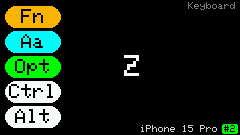
No header on the main input screen. Left pill column shows Fn / Aa / Opt / Ctrl / Alt; center shows a large last-key echo; footer shows link status, green device name, and a yellow slot badge.
Screenshots
Main / USB / Mouse
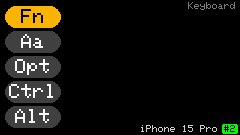
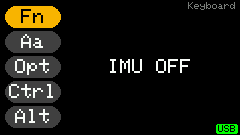
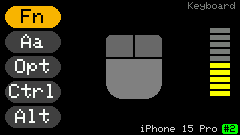
Hosts / Special keys
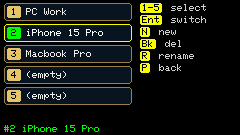
Shortcuts
Mode and exit
| Key | Action |
|---|---|
Fn + u | USB HID |
Fn + b | BLE HID |
Hold Fn | Toggle IMU→mouse pointer |
Fn + p | BLE host list (switch / pair) |
| Tap BtnGO | Open / close the BLE host list (same as Fn + p) |
| Hold BtnGO | Exit to main menu (and disconnect BLE) |
Fn + h | Help |
IMU mouse (hold Fn)
Letters are used for clicks (not typed). Digits set sensitivity. Other function keys still go to the host.
| Key | Action |
|---|---|
Left-half letters qwerty asdfg zxcv (ygv left) | Left click |
Right-half letters uiop hjkl bnm (uhb right) | Right click |
1–9 / 0 | Sensitivity 1..10 |
Center shows a mouse icon; right side is the sensitivity bar. If BLE pointer does nothing, forget the device on the host and re-pair.
Transport and sensitivity are saved under hid_keyboard in config.json and restored the next time the app opens. The IMU mouse toggle is temporary and defaults to off whenever the app opens.
BLE host list (Fn+p / tap BtnGO)
Stores up to 5 paired hosts; only one connected at a time.
| Key | Action |
|---|---|
1–5 / ; , . / | Select slot |
| Enter / Space | Switch to that host (disconnect current; on the target, tap Cardputer KB in Bluetooth) |
n | New pairing (needs free slot; rejects reconnect from old hosts) |
r | Rename current slot alias (Enter saves; empty name shows MAC again; ` cancels) |
| Backspace | Delete current slot pairing |
p / h / tap BtnGO | Close list |
Fn layer (Help page 2)
| Key | Action |
|---|---|
` (bare) | Esc (to host) |
Fn + Backspace | Delete |
Fn + ; , . / | Arrow keys |
Fn + 1–0 | F1–F10 |
Fn + - = | F11 / F12 |
Fn + A/a | CapsLock |
Fn + modifiers | Right-side modifier mapping (see Help) |
Usage
- Use a cable for USB, or
Fn+bfor BLE keyboard then pair on the host (Fn+p→n). - Multiple hosts:
Fn+por a tap on BtnGO opens the list, select a slot, Enter to switch.reconnecting #Nmeans waiting for the target PC to auto-reconnect (usually within a few seconds; otherwise tapCardputer KBin Bluetooth again). - New pairing with
n: rejects old hosts grabbing the link, then search/pair on the new PC. - Type normal characters directly; bare
`sends Esc; other function keys use the Fn layer. - Hold
Fnfor IMU mouse;ygvleft /uhbright click;1–0set sensitivity; other function keys still work. - Always exit by holding BtnGO (disconnects BLE); a short tap only toggles the host list;
`is Esc to the host. - BLE combo keyboard+mouse: after firmware update, forget
Cardputer KBand re-pair if the pointer does nothing.