
Time
Main menu key: t
Four sub-modes: Uptime, Clock, Countdown, Stopwatch. The app is always full-screen (no header); the mode name flashes briefly in the top-left when you switch.
Screenshots
Uptime / Clock / Countdown / Stopwatch
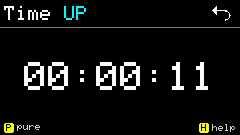
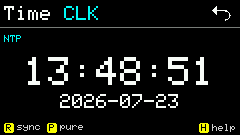
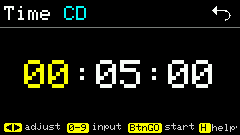
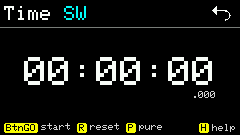
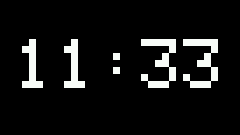
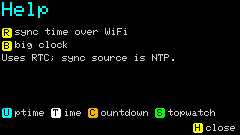
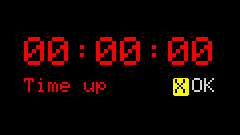
Large clock / Help / Countdown finished
Shortcuts
Mode switch (Help summary)
| Key | Action |
|---|---|
u | Uptime |
t | Clock |
c | Countdown |
s | Stopwatch |
r | Sync time / reset (depends on mode) |
| BtnGO | Start / pause / resume |
h | Help |
Uptime
| Key | Action |
|---|---|
h | Help |
Clock
| Key | Action |
|---|---|
r | NTP sync (needs WiFi) |
b | Toggle large dot-matrix clock (HH:MM only) |
h | Help |
Countdown · SETUP
| Key | Action |
|---|---|
| Arrow keys | Adjust h/m/s fields |
0–9 | Digit input |
| BtnGO | Start |
h | Help |
Countdown · running / paused
| Key | Action |
|---|---|
| BtnGO | Pause / resume |
r | Reset |
h | Help |
Stopwatch
| Key | Action |
|---|---|
| BtnGO | Start / pause / resume |
r | Reset |
h | Help |
Usage
- Default mode comes from config
time.default(e.g.up); timezone istime.timezone(e.g.CST-8). - Clock uses RTC; with network,
rdoes NTP. - On Clock,
benters Big Clock (HH:MM dot-matrix only, no seconds). - Countdown / Stopwatch keep timing after leaving the Time App or switching sub-modes — see below.
Power saving (clock display)
Time does not auto-blank the screen, dim the backlight, or enter ESP light / deep sleep. Long-running clock display saves power by slowing the main loop; for real sleep use the main-menu Sleep app.
Where it applies
| Scenario | Idle slow loop? |
|---|---|
| Uptime / Clock (including Big Clock) | Yes — after ~1 minute with no activity |
| Help open | No — keeps a faster poll |
| NTP sync in progress | No — stays ~30ms poll for timeouts / reconnect |
| Countdown / Stopwatch | No — need higher refresh; not idle-throttled |
Idle slow loop (~1 s tick)
After 60s with no keys / mode switches (TIME_IDLE_SLOW_MS):
- Main-loop
delayaligns to the next whole second (~1 s tick); keys respond within about 1 s. updateRtcApppoll goes from ~30ms to 1000ms.- Normal Clock / Uptime UI still refreshes every 1 s so the seconds digit does not skip.
While active (Uptime / Clock): main loop ~30ms to avoid busy-spin power waste while staying responsive.
Any key or mode switch inside Time resets the idle timer; Help open blocks the slow loop.
Big Clock redraw
| State | Redraw check interval | Notes |
|---|---|---|
| Active | ~15s | HH:MM only — no need to redraw every second |
| Idle slow loop | ~1s | Minute flips stay timely |
vs Sleep
| Capability | Time clock display | Sleep |
|---|---|---|
| Slower CPU polling | ✓ ~1 s when idle | — |
| Screen off / backlight 0 | ✗ | ✓ when entering sleep |
| ESP light / deep sleep | ✗ | ✓ |
Good desk-clock setup: stay on Uptime or Clock (optional b large digits); after ~1 minute the loop slows automatically. Use Sleep when you want deeper power saving.
Background running
Uptime and Clock only refresh while Time is foreground; Countdown and Stopwatch state lives in memory and is not cleared when switching sub-modes or returning to the main menu.
Countdown
| Scenario | Behavior |
|---|---|
| Running, switch to Clock / Uptime, etc. | Keeps timing; returning to Countdown shows remaining time |
| Running, back to main menu or another App | Keeps timing; main loop pollCountdownBackground detects expiry |
| Expires while not on Countdown page | Auto-enters Time App Countdown end page |
| Expiry alarm | Beep-beep-pause loop, up to 30s; rings even off CD page (volume from sound.volume) |
| Stop alarm | On end page, x cancels and returns to setup; or r reset |
While PAUSED, remaining ms are saved; resume recomputes end time from millis(). Leaving the App does not call leaveCountdownApp to stop — only expiry, reset, or cancel alarm ends it.
Stopwatch
| Scenario | Behavior |
|---|---|
| Running, switch sub-mode / main menu | swRunning and elapsed stay; continues from millis() |
| Re-enter Stopwatch | Shows correct elapsed (including time away) |
| Foreground refresh | While running, ~30ms refresh, display to 1ms |
| Reset | Double-beep r clears |
No global expiry popup for stopwatch; screen does not refresh while away, but time still advances.
Sub-mode switch
Within Time, u / t / c / s keep Countdown and Stopwatch running state (enterCountdownApp / enterStopwatchApp only redraw; they do not reset phase).