
I2C Scan
Open from:
- Main menu
h→ Hardware Test7/i— InI2C internal bus - Main menu
h→ Hardware Test8/e— ExI2C external bus - Main menu
e→ Grove2/i— EXI2 (same scanner as Hardware Test ExI2)
No header. Scans addresses 8–119 and lists each hit as 0x address, chip name, and role, with SDA / SCL beside the title. A 4x4 dot precedes each row: green = known address map, gray = unknown. External chip wiring and driver APIs: Grove.
- InI2: onboard chips (Adv:
0x18ES8311 codec,0x34TCA8418 keyboard,0x68BMI270 IMU). - ExI2: Grove / EXT peripherals; chip names are likely matches (for example,
0x10/0x11RDA5807M or0x60TEA5767).
Screenshots
InI2C / ExI2C
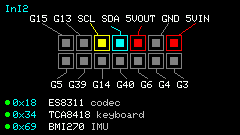
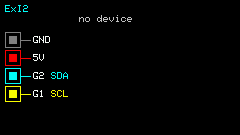
Shortcuts
| Key | Action |
|---|---|
h | Help (In: known chips; Ex: pins and likely names) |
r | Rescan |
Entering the App runs a scan; press r to scan again without leaving. A scan may briefly wake a Grove FM module; the App mutes it and puts it in standby afterwards, and again when you leave.
Usage
- InI2: confirm onboard I2C (keyboard / IMU / codec).
- ExI2: left-side Grove (top→bottom GND / 5V / G2=SDA / G1=SCL) or EXT (G8=SDA G9=SCL). Radio wiring: Radio.
- Empty bus →
no device; unknown address →--/unknown.