
Battery
Main menu key: p
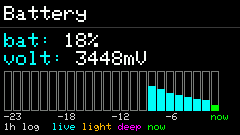
Shows live charge level and roughly 1 hour of battery history (including sleep-segment markers).
Screenshots
Shortcuts
This App’s footer is mainly legend text; there are no dedicated letter action keys.
| Legend | Meaning |
|---|---|
| 1h log | Historical samples |
| live | Live segment |
| light | During light sleep |
| deep | During deep sleep |
| now | Current point |
Back: ESC / GO. Page keys do nothing when there is no extra page.
Usage
- Open to see current percentage and the curve.
- History is sampled in the background. Before the clock is synced, samples use uptime and are timestamped after NTP/RTC. Light and deep sleep use different curve colors.
- Useful for spotting runtime and sleep drain trends — not a precision fuel-gauge calibration tool.