
Config
Main menu key: u
Via the device SoftAP or a connected WiFi, the device becomes a Web server. On the same LAN, a computer can open the config page at the Cardputer IP or AP address.
You can manage devices, groups, WiFi, brightness, IR defaults, screenshot download, and more. Settings are saved in config.json on the device Flash storage.
Screenshots
LAN / AP / Help
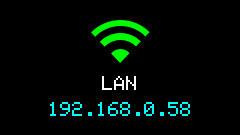
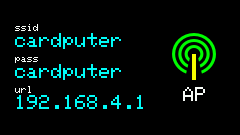
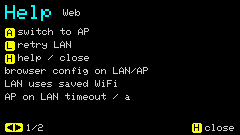
Shortcuts
| State | Key | Action |
|---|---|---|
| Connecting / AP | a | Skip LAN, switch to AP hotspot |
| LAN ready | a | Switch to AP hotspot mode |
| Failed | Re-enter u | Retry |
| Any | h | Help |
| In Help | a | AP |
| In Help | l | Retry LAN |
Back to menu: ESC / GO.
Usage
- On enter, try saved WiFi for LAN first; on failure or
a, start SoftAP. - The screen shows the IP or hotspot SSID; open that address in a phone / computer browser.
- Common Web entry points:
- Device and group editing
/ac-auto: AC automation (ac_auto)/wifi: up to 5 WiFi profiles and Active/shots: screenshot preview, download, delete one, clear TF / Flash/gps: GPS run list, GPX import / export / delete/about: firmware version- RGB565 bake:
POST /bake-rgb565(generate icon bake files on device; see Image processing and baking)
- Saves write to LittleFS; some items (invert, volume) take effect immediately.
After setup, press ESC back to the menu, then use Mijia / WiFi / AC Auto.
Mijia device management
The Web tool can also add device info manually and set device groups.
AC automation (/ac-auto)
The Web nav 空调自动化 maps to ac_auto: pick a BLE HT sensor, on/off temperature thresholds, filter count, and the IR brand / mode / setpoint / fan used when powering on.
Below the settings form, a How it runs section covers:
- On device, press
nfor AC Auto, thentto start AUTO before any IR is sent. - Temp >
on_tempforfilterhits → AC on; <off_tempforfilterhits → AC off. - Between the two thresholds, streaks clear (hysteresis) so the unit does not chatter.
- BLE listen duty cycle (~6 min listen / ~4 min nap) starts on app enter, independent of AUTO.
Full keys and UI notes: AC Auto.