
Options
Main menu key: o
On-device settings are grouped into screen, sound, clock, calendar, infrared, and ac auto. The UI is a left category sidebar plus a right field pane; enums such as timezone / brand open a picker. Changes write to config.json (volume is debounced to disk). The header title is Options.
Screenshots
screen / sound
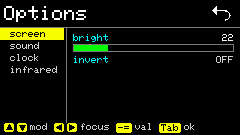
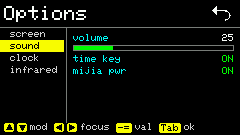
Shortcuts
Sidebar (category focus)
| Key | Action |
|---|---|
| ↑ ↓ | Select category |
| Enter / → | Edit fields on the right |
Field pane
| Key | Action |
|---|---|
| ↑ ↓ | Select setting row |
- = | Decrease / increase value (toggles flip) |
| Enter | Toggle switches; open picker for enums |
` / ← | Back to sidebar |
Picker (timezone, brand, default, etc.)
| Key | Action |
|---|---|
| ↑ ↓ | Select option |
| Enter | Confirm and return to fields |
` / ← | Cancel and return to fields |
Press ` again on the sidebar to return to the main menu. On screen fields, 0–9 set brightness quickly.
Usage
Common items:
| Config path | Meaning |
|---|---|
screen.brightness | Backlight brightness |
screen.invert | Screen invert (applies immediately) |
sound.time_key | Time page key sound |
sound.mijia_on_off | Mijia on/off beep |
sound.screenshot | Screenshot beep (Fn+s) |
sound.volume | Speaker volume 0–100 |
time.default / time.timezone | Time default mode / POSIX timezone |
calendar.week_start | Calendar week start: sunday / monday |
infrared.* | IR default category and brand |
ac_auto.* | AC Auto sensor, on/off thresholds, filter, power-on IR params |
You can also edit the same config via Config Web (including /ac-auto).