
Mini Games
Main menu key: g
A collection of fourteen full-screen interactive toys and games. Enter with number keys or letter shortcuts. The shelf holds 8 entries per page — flip pages with [ ] or the arrow keys, and the number keys are renumbered from 1 on each page; letter shortcuts work from any shelf page. ESC / GO returns a child game to the shelf; press it again on the shelf to return to the main menu.
Screenshots
Picker
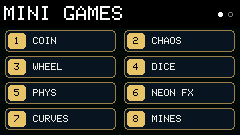
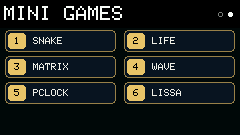
Page 1
| Key | Game | Controls |
|---|---|---|
1 / c | Coin Toss | Space / GO or shake the device |
2 | Double Pendulum | Space / GO resets; r randomizes the initial pose |
3 / w | Prize Wheel | Hold Space / GO to charge a spin; shake for medium power; - / = sets 2–12 items (works while spinning; resets the wheel) |
4 / d | Dice | Hold Space / GO or shake to toss; - / = changes dice count |
5 | Newton Cradle | 1–3 launches balls; Space / GO replays; r resets |
6 | Neon FX | EASD, m, c, - / =, r; Space / GO pulse flash |
7 | Curves | 1–9 select curve; - / = amplitude; , / . frequency; q / e phase; Space / GO toggles animation |
8 / m | Minesweeper | Arrows move; ] / Space digs / chords; [ / f flags; 1–3 difficulty; b records |
Page 2
| Key | Game | Controls |
|---|---|---|
1 / s | Snake | Arrows / EASD steer; Space pauses; m wall or wrap; - / = speed |
2 / l | Conway Life | Space runs / pauses; n steps; r randomizes; 1–6 patterns; Enter edits a cell |
3 / x | MATRIX | - / = speed; Space / GO pulse burst; r reshuffles |
4 / v | WAVE | - / = speed; c theme; Space / GO amplitude pulse |
5 / t | PCLOCK | Space / GO / r morph; m toggles HH:MM / with seconds |
6 | LISSA | - / = speed; c theme; Space / GO phase pulse |
Letter shortcuts
| Key | Game |
|---|---|
c | Coin |
w | Wheel |
d | Dice |
m | Minesweeper |
s | Snake |
l | Life |
x | MATRIX |
v | WAVE (w is used by Wheel) |
t | PCLOCK |
Common shortcuts
| Key | Action |
|---|---|
1–8 | Open the matching game on the current shelf page |
| Letters (above) | Jump to that game from any shelf page |
[ ] / arrows | Flip shelf pages |
h | Open help for the current game |
ESC / GO | Child game → shelf; shelf → main menu |
Controls are kept off the game canvas and live in each game's h help page. Coin Toss, Prize Wheel, and Dice use BMI270 input. The physical GO button (BtnA) mirrors Space for toss, charge, replay, pulse, and dig actions (menu back still uses the ESC / GO keyboard mapping).
Minesweeper and Snake keep their records on flash (/mines_rec.dat, /snake_rec.dat), so they survive reboots and firmware updates.