
Mijia
Main menu key: m
Local miIO (LAN) and BLE Mijia device control: detail, list, grid, groups, and device hotkeys.
Screenshots
Detail
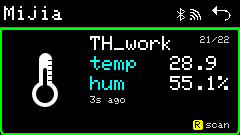
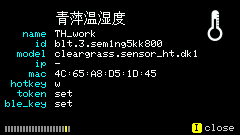
Device info (i)
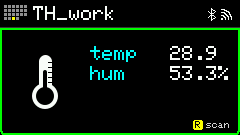
HT working / Quick panel
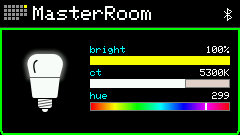
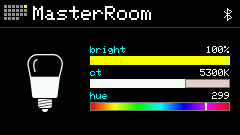
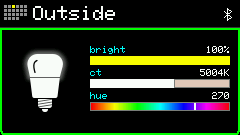
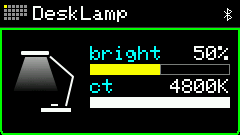
Lights (brightness / CT / hue)
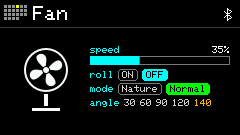
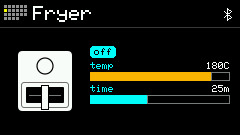
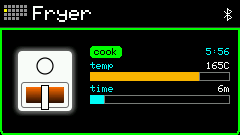
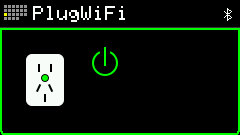
Fan / air fryer / plug
Shortcuts
Common
| Key | Action |
|---|---|
ESC / GO | Back to main menu |
h | Open / close Help |
o | On |
f | Off |
i | Device info |
t / BtnGO | Toggle |
r | Refresh status (BLE scan for sensors) |
q | Quick-select keymap (keyboard occupancy) |
Fn + q | Edit hotkey for current device |
l | List view |
g | Grid view |
d | Group view |
; , / ↑← · . / / ↓→ | Switch device / page (depends on view) |
[ ] | Page grid |
List
| Key | Action |
|---|---|
Arrows / ;,. / | Page |
l | Back to detail (or keep list nav; follow tip) |
g | Switch to grid |
Bottom tip example: page pN/M · arrow page · l · g
Grid
| Key | Action |
|---|---|
| Arrow keys | Move selection |
[ ] | Page |
1–9 | Select cell directly |
o / f / t / BtnGO | On / off / toggle |
Group
| Key | Action |
|---|---|
, . | Switch group |
o / f / t | Group on / off / toggle |
- = / 1 0 | If all members are lights: brightness / presets |
r | Refresh |
[ ] | Page group members |
Quick select (q)
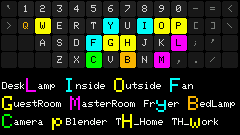
Shows the real Cardputer keyboard layout with occupied hotkeys highlighted, plus bound device names below (hotkey letter tinted in the name). If any hotkeys are configured, this page opens first when entering Mijia. No tip bar; q goes back.
| Key | Action |
|---|---|
q | Back to detail |
Configured a–z / 0–9 | Jump to device (q reserved for this page) |
Hotkey edit (Fn+q)
| Key | Action |
|---|---|
a–z / 0–9 | Enter hotkey |
| BtnGO | Save; confirm replace on conflict |
Detail · by device type
LIGHT (yeelink.light.*)
| Key | Action |
|---|---|
- = | Brightness − / + |
1 / 9 / 0 | Brightness presets (~1% / 90% / 100%) |
[ ] | Color temperature (CT-capable models) |
j k | Hue (bslamp2 / color8 / color2) |
FAN_P5 (dmaker.fan.p5)
| Key | Action |
|---|---|
- = | Speed |
w | Oscillate |
m | Mode |
a | Swing angle |
1 / 9 / 0 | Level presets |
FAN_GENERIC (model contains .fan.)
| Key | Action |
|---|---|
1–4 | Level |
Air purifier F20 (dmaker.airpurifier.f20)
| Key | Action |
|---|---|
1–5 | Mode |
- = | Speed |
AIR_FRYER
| Key | Action |
|---|---|
- = | Temperature |
[ ] | Time |
Temp/humidity / BLE event (SENSOR_HT · BLE_EVENT)
| Key | Action |
|---|---|
r | BLE scan refresh |
PLUG / other GENERIC
On/off and refresh only.
Usage
Configure devices
In config.json devices[], fill name / name_zh / id / ip / token / model, etc. BLE sensors also need mac and ble.key. You can also manage them in the Config Web UI.
Optional hotkey (a–z / 0–9, q reserved) for one-key jump; colored hotkey letters appear next to names in list / grid.
Groups go in device_groups[], members linked by device id.
View switching
- Detail: full status and type-specific controls for one device
- List
l: dense browsing - Grid
g: icon grid, good for quick on/off - Group
d: batch control by room / scene
With no devices, the tip prompts u for setup.
Communication
- Most Wi-Fi devices: LAN miIO (same subnet as Cardputer)
- Temp/humidity, motion / remote, etc.: BLE scan of advertisements
Update mechanism
Like Cursor, Mijia runs miIO query / control on a FreeRTOS background task. The main loop handles keys, BLE polling, and partial redraws; never draw from the task. Grid cell refreshes are queued on the main loop.
Background task
| Action | Behavior |
|---|---|
| Enter App | Connect WiFi → pull current device status |
| Switch device / page | Bump gen, invalidate unfinished old work |
| On / off / brightness | Async SET, write back to UI when done |
| Grid / group | Queue in order QUERY or batch SET for page devices |
| Leave App | Cancel work, wait for task exit, turn off WiFi immediately, stop BLE |
Single-device query timeout ~2s; late results are dropped and status shows timeout. If a task is already running, new work is staged and chained when it finishes.
Wi-Fi devices (miIO)
- Entering Mijia auto-connects configured WiFi, only while Mijia is foreground; disconnects on leave.
- Connect time is not counted in device query timeout; QUERY starts after connect.
- After control ops (on / off / brightness), devices like air fryers get a delayed QUERY to sync lagging state.
BLE devices
BLE must not scan inside the background task (can crash). The main loop handles it non-blocking:
| Mode | Trigger | Notes |
|---|---|---|
| Background listen | Auto on enter Mijia | ~30s per round, rotates BLE ads into per-device cache |
| Focused scan | Detail r | Interrupts background; focuses current device ~30s; then resumes background listen |
Detail shows cached reading and Xs ago age; with no cache shows listening; r forces refresh. Grid / list BLE cells use cache only, not the miIO queue.
Partial refresh
- Detail: icon and right control panel redraw separately; prefer dirty regions on status change.
- Grid: after task write-back, changed cells are queued for main-loop refresh to avoid full-page flicker.
- Group: bottom on/off / brightness bar can partial refresh; batch ops run member order and summarize success / fail.
Local timer
Air fryer detail: remaining time from the device ticks locally every second in the right panel without waiting for the next QUERY.
Supported device types (model)
Firmware classifies by model string (see mijiaClassifyModel). The table below is by control capability; unlisted models fall into GENERIC (still on/off; matching icons if any).
| Type | Match rule (examples) | Capability summary | Icon |
|---|---|---|---|
| LIGHT | yeelink.light.* | On/off, brightness; some CT / hue | see below |
| FAN_P5 | exact dmaker.fan.p5 | Speed, oscillate, mode, swing |  |
| FAN_GENERIC | model contains .fan. | Levels 1–4 | |
| AIR_PURIFIER_F20 | exact dmaker.airpurifier.f20 | Mode, speed, AQI, etc. |  |
| AIR_FRYER | contains airfryer or .fryer. | Temperature, time |  |
| PLUG | contains .plug. | On/off |  |
| SENSOR_HT | contains sensor_ht or .ht. | BLE temp/humidity |  |
| BLE_EVENT | contains .motion. / .remote. | BLE event device | (default icon) |
| GENERIC | other | Basic on/off |  |
Light model notes
| model trait | Extra capability |
|---|---|
yeelink.light.lamp2 | CT ~2500–4800 K |
yeelink.light.lamp1 / lamp4 | CT ~2700–5000 K |
contains .mono | Fixed CT (not adjustable) |
contains bslamp2 / color8 / color2 | j/k hue |
Config examples: yeelink.light.lamp2, miaomiaoce.sensor_ht.t2.
Device icon assets
Icons match model substrings (longer names first). Assets from firmware data/icon/device/:
| basename | Off | On | Typical model fragment |
|---|---|---|---|
airpurifier | |  | airpurifier |
bslamp2 |  |  | bslamp2 |
lamp2 |  |  | lamp2 |
light |  |  | fallback for models containing light |
fan | |  | fan |
fryer | |  | fryer |
plug | |  | plug |
sensor_ht | |  | sensor_ht |
camera |  |  | camera |
cooker |  |  | cooker |
juicer |  |  | juicer |
wifispeaker |  |  | wifispeaker |
default | |  | unmatched |
Grid / list also use *_25w.png small icons; on device, same-name .rgb565 bake files are preferred for faster draw.