
WiFi
Main menu key: w
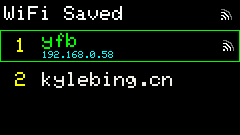
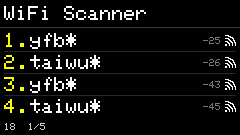
Opens the saved-profile list first (3 evenly spaced rows per page). Scan list shows 4 rows per page. The header title follows the page: WiFi Switcher / WiFi Scanner / WiFi Password / WiFi Connect / WiFi Failed. Switch profiles, scan nearby APs, and connect with a password. Config supports up to 5 wifis[] entries; wifi_active selects the current profile.
Screenshots
Saved profiles
Scanner
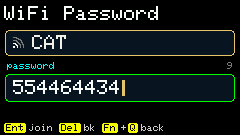
Password input
Shortcuts
| State | Key | Action |
|---|---|---|
| Saved list | ; , . / / arrows | Move selection (wraps across pages) |
| Saved list | Enter | Connect selected profile |
| Saved list | Backspace | Delete selected profile |
| Saved list | 1–3 | Pick profile on current page and connect |
| Saved list | [ / ] | Page |
| Saved list | r | Retry active |
| Saved list | s | Open scan |
| Scan list | 1–4 · , / . | Pick AP / page |
| Scan list | w / Esc | Back to saved list |
| Password | Fn+Q | Back to scan list |
| Password | Alphanumeric · Enter | Connect |
| Password | Del / Backspace | Delete char |
| Connecting | 1–3 | Switch to another profile |
| Connecting | r / c | Retry / cancel |
| Failed | r | Retry with same password |
| Failed | p | Back to password page |
| Failed | Enter / w / Esc | Back to scan list |
| Any | h | Help |
Usage
- Enter: opens the saved list with the cursor (yellow outline) on the current active profile; if active is not connected, that row shows orange
connecting; on success, a signal icon appears on the right and the IP below the row. - Switch profile: move the cursor with the arrow keys and press Enter to set active and connect;
1–3still picks a row on the current page directly. Delete profile: Backspace removes the highlighted profile; if it is the network you are currently on, the link is dropped too. - Saved ↔ Scan:
sopens scan; on the scan page,w/ Esc returns to the saved list. A trailing*on an SSID means the network requires a password. - Scan → Password: pick an AP, enter password, Enter to connect; success writes config and returns to the saved list (same source as Config Web
/wifi). - Connect page: shows the target AP card, a sliding progress bar, the remaining seconds (up to 10s), and signal / auth / channel details.
- Failed page: auth failure, missing AP, or timeout stops on the failed page with the reason in a red card (e.g.
wrong password?). It never dismisses itself — press Enter (orw/ Esc) for the scan list,rto retry,pto edit the password. A failed manual join no longer drops back to the switcher or marks the active profile astimeout. - Other Apps use only the current active profile; they do not round-robin multiple SSIDs.
Legacy top-level "wifi":{ssid,password} is migrated to wifis[] on boot.