
GPS
Open from: main menu e → Grove 4 / g
AT6668 NMEA 0183 (~115200). Two hardware sources; on enter the App auto-detects (Cap first, then Grove):
| Source | Hardware | Host UART | Notes |
|---|---|---|---|
| Cap LoRa | Cap LoRa-1262 built-in GNSS (ATGM336H @ AT6668) | RX=G15 / TX=G13 | Does not take left Grove I2C; Radio / NFC stay usable on Adv + Cap |
| Grove | GPS Unit (AT6668) or compatible UART NMEA | RX=G1 / TX=G2 | Ex_I2C.release() on enter; I2C restored on leave |
Settings shows the active source read-only (Cap LoRa G15/G13 / Grove G1/G2 / none). Probe waits ~1 s for $; if neither answers, Grove stays open so a slow-starting unit can still come up (then labeled Grove).
Cold start (power loss or long idle) takes about 20+ seconds to acquire satellites; hot start (recent fix) is about 1 second. Clear outdoor sky is faster; indoors you often stay on NO FIX.
Screenshots
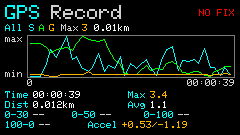
Empty (NO FIX / before acquire)
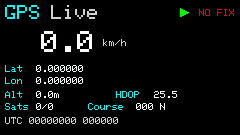
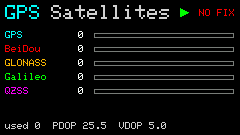
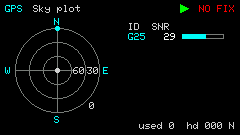
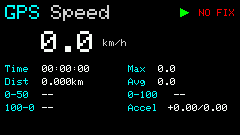
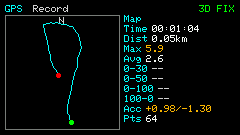
With fix (3D FIX)
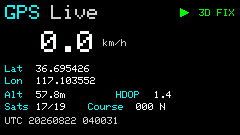
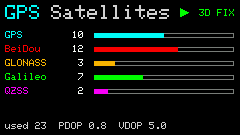
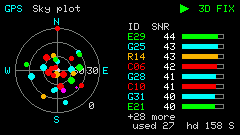
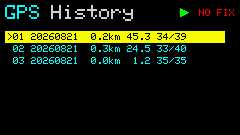
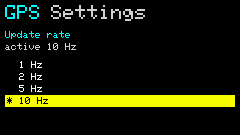
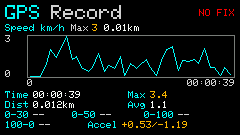
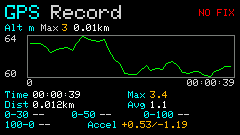
Chart: Speed / Alt / Accel / All / Map
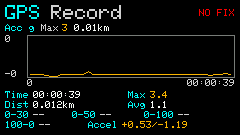
Module & wiring
Grove GPS Unit
Use an M5Stack GPS Unit (AT6668) or a compatible UART NMEA module on the left Grove (HY2.0-4P). This path is not I2C — the same pins run as serial:
| Grove pin | Role (GPS) |
|---|---|
| GND | Ground |
| 5V | Power |
| G2 | TX (module → host RX) |
| G1 | RX (host TX → module) |
Baud 115200. With the Grove source, do not share the left Grove with Radio / NFC at the same time.
Cap LoRa-1262 GNSS
On Cardputer-Adv, attach Cap LoRa-1262 (built-in ceramic GNSS antenna). UART matches the official Arduino sample: Serial1 RX=15 / TX=13. This App uses GNSS only (no SX1262 LoRa init). The Cap HY2.0-4P can still host other Grove I2C devices.
Pages
| Key | Page | Content |
|---|---|---|
1 | Live | Speed, lat/lon/alt, HDOP, sats, course, UTC |
2 / s | Speed | Trip stats, 0–50 / 0–100, braking, peak g |
3 | Satellites | GPS / BeiDou / GLONASS / Galileo / QZSS + PDOP/VDOP |
4 | Sky plot | Sky map (north-up) + SNR list |
5 / l | History | Saved runs; Enter opens chart, Bk deletes |
6 / o | Settings | Active source (read-only) + rate 1 / 2 / 5 / 10 Hz (PCAS02, NVS) |
Header right: NO FIX / 2D FIX / 3D FIX; while recording a stop icon blinks.
Shortcuts
Full list: h Help (multi-page).
| Key | Action |
|---|---|
h | Help |
1–6 / s l o | Switch pages (table above) |
Space / BtnGO | Start / stop speed recording |
r | Reset Live / Speed stats (restarts record if active) |
m | On chart: cycle Speed / Alt / Accel / All / Map |
| ↑ ↓ etc. | Select history row or settings rate |
Enter | History → chart; Settings apply rate |
Bk | Delete selected history |
ESC | Chart → History; Settings → previous page; Help → close |
Fields
| Field | Meaning |
|---|---|
| Lat / Lon / Alt | Latitude / longitude / altitude (m) |
| HDOP / PDOP / VDOP | Dilution of precision (lower is better) |
| Sats | Used / visible satellites |
| Course | Heading (degrees) |
| 0–30 / 0–50 / 0–100 | Time to reach that speed |
| 100–0 | Brake time from 100 km/h |
| Accel | Peak accel / brake (g) |
Sky plot: rings are elev 0° / 30° / 60°; dots G/C/R/E/J by system, size by SNR.
Usage
- Plug a Grove GPS Unit, or use Adv + Cap LoRa-1262; main menu
e→g(or4). - Open Settings (
o) to confirm the source; wait outdoors for3D FIX(cold ~20+ s, hot ~1 s). Space/ side button starts a run; press again to stop and save to History.- Update rate often ships at 1 Hz; max 10 Hz uses more power.
- Leaving the App stops recording and ends UART; Grove I2C is restored if that source was used.
Records & route
- On History chart,
mcycles Speed / Alt / Accel / All / Map (lat/lon path on the left, summary on the right). - Import / export: open Config Web → GPS (
/gps). Format is GPX 1.1 (universal for map apps); sprint peaks, fused speed, accel, sats, etc. live incardputer:extensions for a full round-trip. Importing when 12 runs are full drops the oldest.