
Hardware Test
Main menu key: h
A second-level entry for display, sensor, and peripheral tests. The shelf holds up to 8 entries per page — flip with [ ] or the arrow keys; number keys restart from 1 on each page. Some tools also have letter shortcuts that work from any shelf page. ESC / GO returns a child tool to the Hardware Test shelf; press it again on the shelf to return to the main menu.
Screenshots
Picker
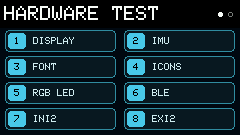
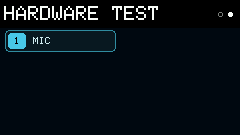
Page 1
| Key | Tool | Description |
|---|---|---|
1 / d | Display | Color, checkerboard, and pixel-line tests |
2 / g | IMU | BMI270 acceleration and attitude visualization |
3 / f | Font | Font preview |
4 / a | Icons | Firmware icon browser |
5 | RGB LED | Onboard LED on/off, color, and brightness |
6 / b | BLE | Scan nearby BLE devices |
7 / i | InI2 | Internal I2C bus scan |
8 / e | ExI2 | External I2C bus scan |
Page 2
| Key | Tool | Description |
|---|---|---|
1 / r | Mic | Live waveform + VU + gain |
Letter shortcuts
| Key | Tool |
|---|---|
d | Display |
g | IMU |
f | Font |
a | Icons |
b | BLE |
i | InI2 |
e | ExI2 |
r | Mic |