
Cursor usage
Main menu key: c
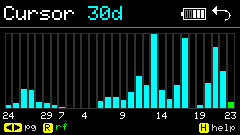
Fetches Cursor usage via cursor.token in config: summary, recent records, day / week / month charts.
Screenshots
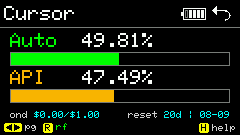
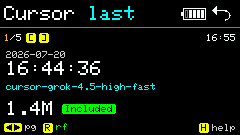
Summary / Latest
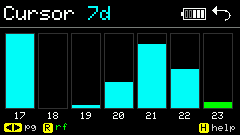
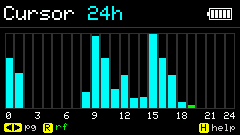
Day / week / month charts
Shortcuts
| Key | Action |
|---|---|
Arrow keys · ;,. / | Page / switch view |
r | Refresh data |
s | Summary |
u | Latest |
d / w / m | Day / week / month charts |
[ ] | Browse records |
| BtnGO | Screen off (power save while viewing) |
h | Help |
Usage
- Put a valid Cursor API token in
config.jsonor Config Web. - Needs WiFi; first request pre-resolves DNS and retries on failure.
- Summary for totals;
d/w/mfor trends;ufor recent rows. - Offline or bad token shows an error — check WiFi and config, then
r.
Update mechanism
Unlike other Apps, Cursor runs network requests on a FreeRTOS background task. The main loop only handles keys and redraw, so the UI stays responsive while fetching. Leaving the App or paging / pressing r invalidates in-flight work via a generation counter.
On-demand fetch
| When | What is fetched |
|---|---|
| Enter App | NTP sync → auth/me → period usage (Summary) |
Switch to u Latest | Last 10 usage events (not prefetched on enter) |
Switch to d / w / m charts | Page events and aggregate (pageSize=200, streaming parse) |
Each view caches separately; charts with cache show immediately. If a same-day fetch is in progress, an ETA countdown is shown.
WiFi
- Connect only when needed: connect before fetch, disconnect immediately after — no long-lived link.
- DNS is pre-resolved before fetch; occasional TLS failures retry automatically.
- When memory is low (Heap / Max Alloc below threshold), HTTPS or task creation is skipped and UI shows
auth lowmem(not necessarily a bad token). See Memory notes.
Idle auto-refresh
After no key input:
- After 1 minute: silent refresh for the current page (no loading UI).
- Every 5 minutes after that: repeat silent refresh until a key press (timer resets).
| Current page | Silent refresh content |
|---|---|
| Summary | Period usage |
| Latest | Recent record list |
| Charts (with cache) | Re-fetch chart for that day span |
Silent refresh failure does not interrupt the current view; user r triggers an active refresh with loading.
Power save
- No input for 5 minutes: main loop slows from 10ms to 1s ticks; a 3×3 blue dot appears at the content top-right for slow-loop state.
- BtnGO screen off: backlight off, but background still refreshes on the schedule above; any key wakes and redraws from latest in-memory data.
Manual refresh (r)
| Current page | Behavior |
|---|---|
| Summary | Full re-fetch (auth + period usage) |
| Latest | Soft refresh: keep old list, replace after background update |
| Charts | Clear current segment cache, re-fetch with countdown |
Related docs
- API fields and endpoints: api/cursor/README.md
- Diagnostic logs:
/cursor.log,/cursor.err(Config Web or Log App)