
Sleep
Main menu key: s
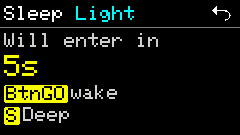
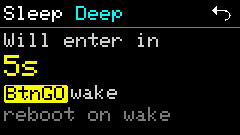
Countdown confirmation before entering light (Light) or deep (Deep) sleep.
Screenshots
Shortcuts
| State | Key | Action |
|---|---|---|
| Light countdown | BtnGO | Wake immediately / cancel entry (per UI); memory is not released |
| Light countdown | s | Switch to deep sleep |
| Deep countdown | BtnGO | Wake note: waking from deep sleep reboots |
| Any countdown | ESC / GO | Cancel and return to main menu |
Usage
- Opening starts a Light countdown; press
sduring it to switch to Deep. - Light sleep: wakes quickly; good for short power saving.
- Deep sleep: saves more power; wake reboots into the main flow.
- Press
ESCbefore the countdown ends to abort sleep.