
Minesweeper
Entry: main menu g → Games 8
A full-rules Minesweeper with per-difficulty records for fastest clear and win streak. The first cell you dig and its eight neighbours are guaranteed mine-free, so every game opens with a cleared area and you can never lose on the first click.
Screenshots
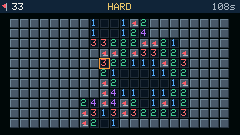
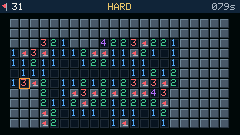
Shortcuts
| Key | Action |
|---|---|
; , . / / arrows / EASD | Move the cursor (hold to repeat) |
Space / ] / Enter / GO | Dig; on a revealed number it performs a chord |
f / [ | Place / remove a flag |
i | Toggle IMU tilt cursor movement (also recenters the neutral pose) |
1 2 3 | Switch to EASY / NORMAL / HARD (starts a new game) |
r | New game |
b | Open / close the records page |
h | Help |
ESC / GO | Back to the game shelf |
Difficulties
| Level | Board | Mines | Density |
|---|---|---|---|
| EASY | 10 × 7 | 10 | 14.3% |
| NORMAL | 15 × 9 | 22 | 16.3% |
| HARD | 22 × 11 | 50 | 20.7% |
How it plays
- Safe first dig: mines are placed after the first dig, excluding that cell and its neighbours, so the board always opens up.
- Flood reveal: digging a zero expands outwards to the number border. Flagged cells are never auto-revealed.
- Adjacent flag / dig pair:
[flags and]digs. The two keys sit side by side so one hand can alternate between them instead of reaching across fromftoSpace;fandSpacestill work. - Chord: put the cursor on a revealed number whose flag count matches it and press
Space/]to open all remaining neighbours at once. This is the main speed-up move — and a misplaced flag will blow you up here. - Timer: starts on the first dig, stops on win or loss, displays up to 999 seconds.
- Loss: the mine you hit turns red, every other mine is exposed, and wrong flags get a red cross.
- Win: remaining mines are auto-flagged and a golden banner appears, showing
NEW BEST!when you beat your record.
IMU tilt cursor
Press i to move the cursor by tilting the device; keyboard arrows keep working. A gold IMU badge appears next to the remaining-mine count while it is active, and boards without an IMU briefly show a red NO IMU instead.
- Neutral pose: pressing
irecords the pose you are holding as the centre, so the device does not need to be level. Pressitwice to recalibrate after shifting position. - All four directions have symmetric range: detection uses the angle the gravity vector has rotated away from the calibrated pose rather than one axis' raw reading, so no direction runs out of range on a steeply held device.
- Direction mapping: tilt up to move up, tilt right to move right. Screen-right is derived from "screen-up × the gravity direction at calibration" instead of being hard-coded to a body axis.
- Mouse-like glide: one step needs roughly 7° of rotation and the cursor keeps travelling while you hold the tilt, releasing below roughly 3.5°. The further you tilt the faster it goes, ramping from one step per 260ms up to one per 45ms at roughly 22° or more.
- Tilt dot: the small box right of the
IMUbadge holds a dot that follows your tilt, so you can confirm all four directions register. - Dig / flag: still
Space/]/Enter/GOandf/[; tilting only moves the cursor.
Records
Press b for the records page, listed per difficulty:
| Column | Meaning |
|---|---|
| BEST | Fastest clear in seconds, -- if never cleared |
| WIN/PLAY | Games won / games played |
| STREAK | Longest win streak ever |
The bottom line shows the current streak for the selected difficulty, which resets to zero on a loss.
Records live in /mines_rec.dat on flash and survive reboots and firmware updates (only reflashing the filesystem clears them).