
Getting Started
Sparks is a multi-app firmware for the M5Stack Cardputer. From the main menu, press a letter key to open the matching App; ESC / GO returns to the menu; press h on any screen for Help.
Flash & Configure
- Flash the firmware and LittleFS with PlatformIO or M5Burner.
- Copy from the repo-root
config.example.json, put device lists, WiFi, Cursor token, etc. intodata/config.json, then runuploadfs— or edit online via the Config App Web UI. - Power on to the Sparks main menu and press the matching letter to open a feature.
Main Menu
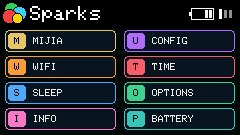
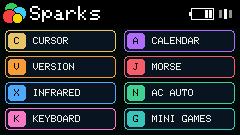
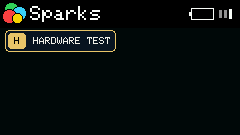
| Key | Short | App | Key | Short | App | Key | Short | App |
|---|---|---|---|---|---|---|---|---|
m | Mij | Mijia | u | Cfg | Config | w | WiFi | WiFi |
t | Time | Time | s | Slp | Sleep | o | Opt | Options |
i | Inf | Info | p | Bat | Battery | c | Cur | Cursor |
a | Cal | Calendar | v | Ver | Version | j | Mor | Morse |
x | IR | Infrared | k | KB | Keyboard | e | Grove | Grove |
g | Game | Mini Games | h | Test | Hardware Test |
The menu paginates with the keyboard arrow keys; no Fn needed.
Next Steps
- App Catalog — browse all apps by category
- Global Shortcuts — back to menu, Help, screenshots, paging, and more