
Calendar
Main menu key: a
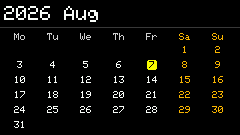
Header shows year/month (2x, not the app name). No tip bar on the main view; shortcuts are under h Help (same year/month header).
Screenshots
Shortcuts
| Key | Action |
|---|---|
, . or arrows | Previous / next month |
- = | Previous / next year |
t | Jump to today's month |
h | Help (press again to close) |
Usage
- Opens on the current month from the system clock (or RTC). If the clock is unset, a default month is shown and you can still browse.
- Set the first day of the week to Sunday or Monday in the Options calendar module (
calendar.week_start). Weekends are orange; today is yellow. - When the clock is unset, a
clock unsethint appears at the bottom-left.